MWMicrowavesF5SE
LG microwave runs but does not heat: F5 and SE diagnosis
SymptomThe microwave turns on, the timer counts down, but the food stays cold or the display shows F5 or SE.
2026.08.02
SafetyMicrowave high voltage circuits contain lethal stored energy even when unplugged. The magnetron and high voltage capacitor are not home repair parts, and the cabinet must not be opened by an unqualified person.
Confirm the complaint before opening the unit
Start with a controlled test. Place a microwave safe cup with 250 ml of water inside the cavity. Run the oven for 60 seconds at full power. A normal unit should make the water noticeably warmer. If the display, fan, light, and turntable operate but the water temperature does not rise, the fault is in the heating circuit or its control path.
Do not assume the magnetron is the cause. A microwave that runs without heat can have a failed door interlock switch, control failure, wiring fault, or a high voltage section problem. The magnetron and high voltage capacitor are not home repair items. They require trained service procedures because the capacitor can retain dangerous voltage after the appliance is unplugged.
Check the power supply and basic conditions
Verify the installation first. Confirm that the microwave is connected to the correct household supply and that the outlet is not loose or overheating. A weak supply can cause unusual operation, but it usually does not create a complete no heat condition while the controls appear normal.
Inspect the cavity and waveguide cover. A damaged waveguide cover, burn marks, or arcing evidence can indicate a separate problem. Do not operate the microwave with damaged internal covers or signs of electrical arcing.
Diagnose the F5 door interlock fault
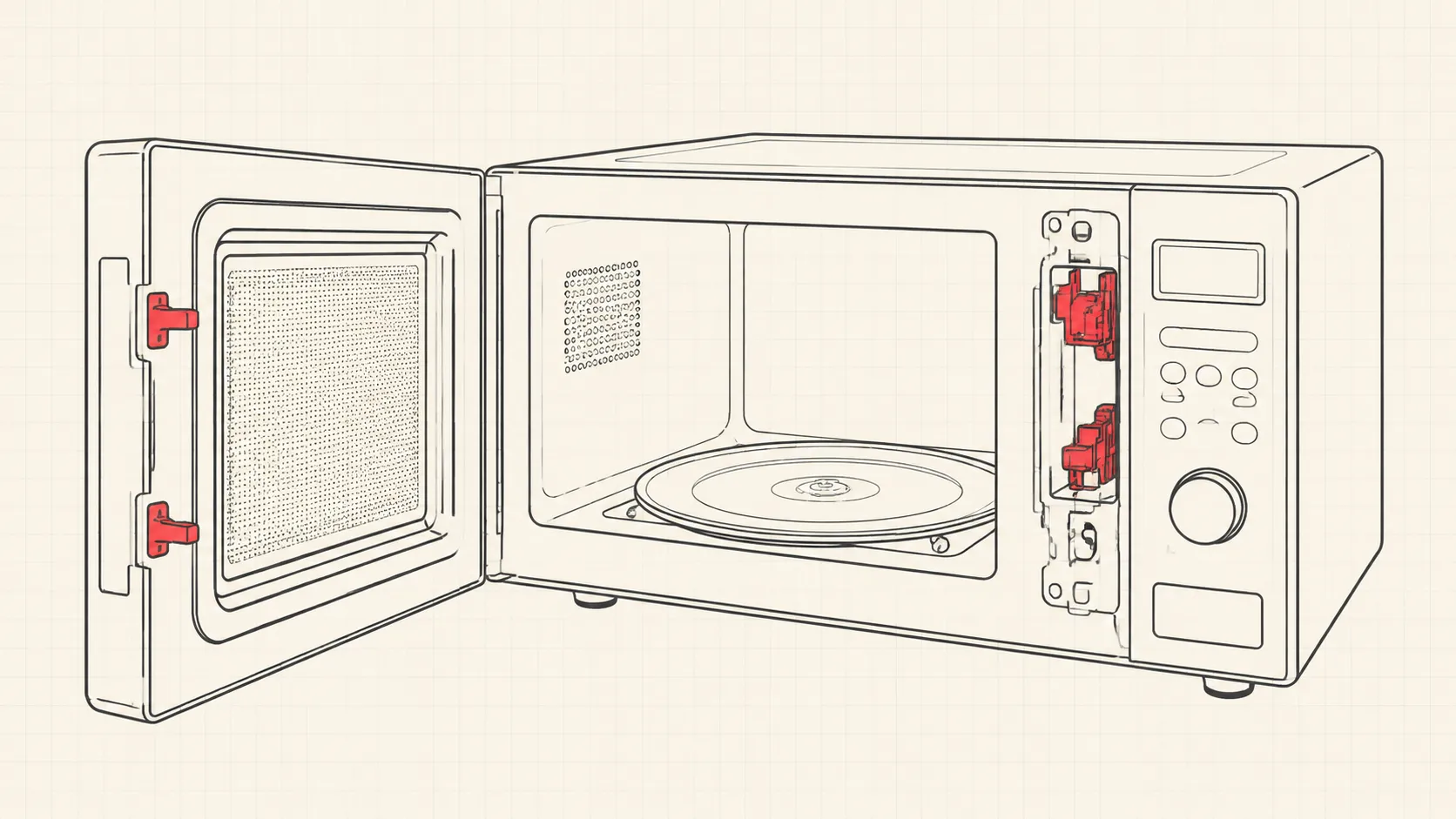
Treat F5 as a door safety circuit issue. LG microwave models use multiple door interlock switches to confirm that the door is correctly closed before high voltage operation is allowed. The exact switch arrangement varies by model, but the system normally includes primary and secondary interlock switches plus a monitor switch.
Inspect the door hooks and latch area with the microwave unplugged. The hooks must enter the latch opening cleanly without excessive movement. A loose door, broken latch bracket, or misaligned hinge can prevent the switches from changing state correctly.
A technician can test the interlock switches with a multimeter continuity function. The switch should change state when the actuator is pressed. A switch that remains open, remains closed, or changes intermittently is defective. Replace the switch assembly or affected switch according to the model service information.
Do not bypass an interlock switch. The door safety system is designed to prevent microwave energy operation with an unsafe door condition.
Diagnose the SE stuck key code
Treat SE as a keypad or control input problem. The SE code usually indicates that the control board sees a key input continuously active. The cause is commonly a stuck membrane keypad, moisture contamination behind the control panel, or a failed control panel assembly.
Disconnect power and inspect the keypad surface. Clean spills from the outside only. Do not spray cleaner into the openings around the control panel. If one button feels physically stuck or the code returns immediately after power is restored, the keypad or control panel may need replacement.
On some models, disconnecting the control panel ribbon connector during professional diagnosis can confirm whether the keypad is holding an input. This is a technician procedure because access requires opening the appliance cabinet and working near hazardous internal components.
No heat diagnosis after door and control checks
Escalate the heating fault correctly. If the door interlock system passes inspection and the SE issue is resolved, the remaining no heat causes may include the magnetron, high voltage diode, high voltage capacitor, transformer, inverter module, or control board output circuit depending on the LG model.
These components operate at dangerous voltages. Do not attempt capacitor discharge, high voltage testing, magnetron replacement, or sealed high voltage repairs as a home task. Stop and call a qualified microwave technician if the fault reaches this stage.
Repair decision and replacement value
Compare repair cost against appliance age. A door switch, latch component, or control panel repair can be reasonable when the microwave is otherwise clean and reliable. A major high voltage repair on an older countertop unit is often not economical because labor and parts can approach the cost of replacement.
For built in or over the range LG microwaves, replacement decisions depend on installation cost and cabinet fit. Record the full model number before ordering parts. Small differences between model revisions can change the correct switch, control panel, and board part numbers.
Final verification
Complete the repair with a heat test. After any door or control repair, verify normal operation with the 250 ml water test. Confirm that the door closes firmly, the display responds correctly, the timer counts normally, and no error code returns.
A microwave is considered repaired only when the safety interlock system and heating function both operate correctly.